
Building an analytics tool in the browser with WebAssembly
Why I chose to use WebAssembly for my analytics tool, and how it could change the future of application development.

This is part 1 in a series where I built a privacy focused analytics tool, which can be run in your browser. Each part is written so that it can be read in isolation, but if you want the full experience, please subscribe to be notified when a new part comes out.
In this part, I will give you an introduction to web assembly, and why it makes sense to built this tool. I hope what you’ll take from this is the following two things.
Why WebAssembly is and important technology to know about, and how it could potentially change the how we built applications in the future
An example of something actually useful, built with WebAssembly
What I’m trying to achieve?
I started with a degree in Finance and Econometrics and later transitioned to data engineering, where I picked up essential software development skills. I've noticed that many domain experts in data don't have access to these technical tools, despite their deep expertise. While there are tools designed for them, they often face accessibility issues—especially in the EU—due to data privacy and security constraints.
To address this, I'm building a tool that empowers domain experts by providing effective techniques without compromising data privacy. This tool will run entirely on the user's PC, ensuring data never leaves their device.
Key challenges I need to solve:
Local Execution: All processing must happen on the user’s machine.
Performance: Techniques should be optimized for efficient computation.
Portability: Users should have minimal setup requirements.
To achieve this, I’ll build a browser-based tool, leveraging client-side execution for local data processing and WebAssembly for performance. This combines the accessibility of a web app with desktop-level performance—precisely what I need.
First, let’s examine how most web applications are built today.
Traditional Web Applications
Most web applications today use a client-server model, where a central server communicates with the client (your computer). In this setup, the server controls what the client displays, and the client sends data to the server for processing before receiving the results back.
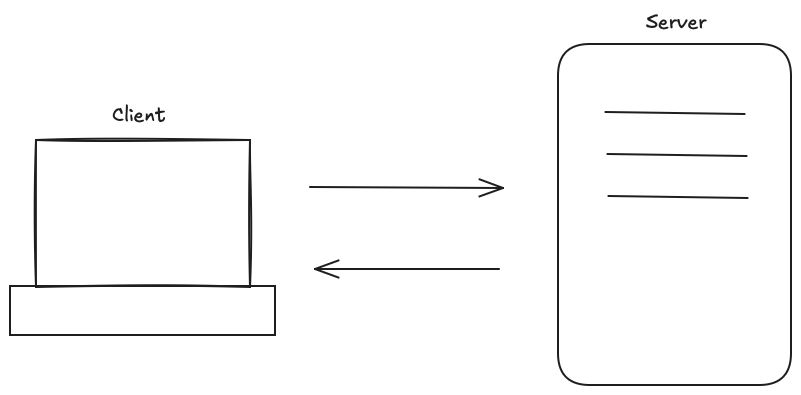
This model is effective for many applications because it centralizes data processing and storage, simplifying synchronization and shared state management across users. For instance, in social media apps, updates by one user are immediately visible to others. Centralized processing also allows developers to apply updates, security patches, and new features in one place, ensuring a consistent experience across devices.
Another advantage is that this model offloads computationally intensive tasks to the server, so client devices don’t need high processing power; they only need a web browser. This flexibility has popularized web applications as they’re accessible on a wide range of devices and operating systems.
However, this model doesn’t suit our needs for two key reasons. First, to protect user privacy, we don’t want to receive client data. Second, processing on a central server would be costly for us. This requires us to shift data processing from the server to the client side.
Client side processing
Client-side processing isn’t new; modern web browsers have supported local JavaScript execution for years. However, JavaScript can be slow, making it unsuitable for our needs.
To address this, we'll use WebAssembly, a newer technology that enables much faster client-side processing than JavaScript, allowing us to handle data locally with the performance we require.
WebAssembly
Let’s explore WebAssembly and why it’s faster than JavaScript. In simple terms, WebAssembly (Wasm) is a set of machine code instructions that can run directly in your browser, unlike JavaScript, which needs to be parsed and interpreted first.
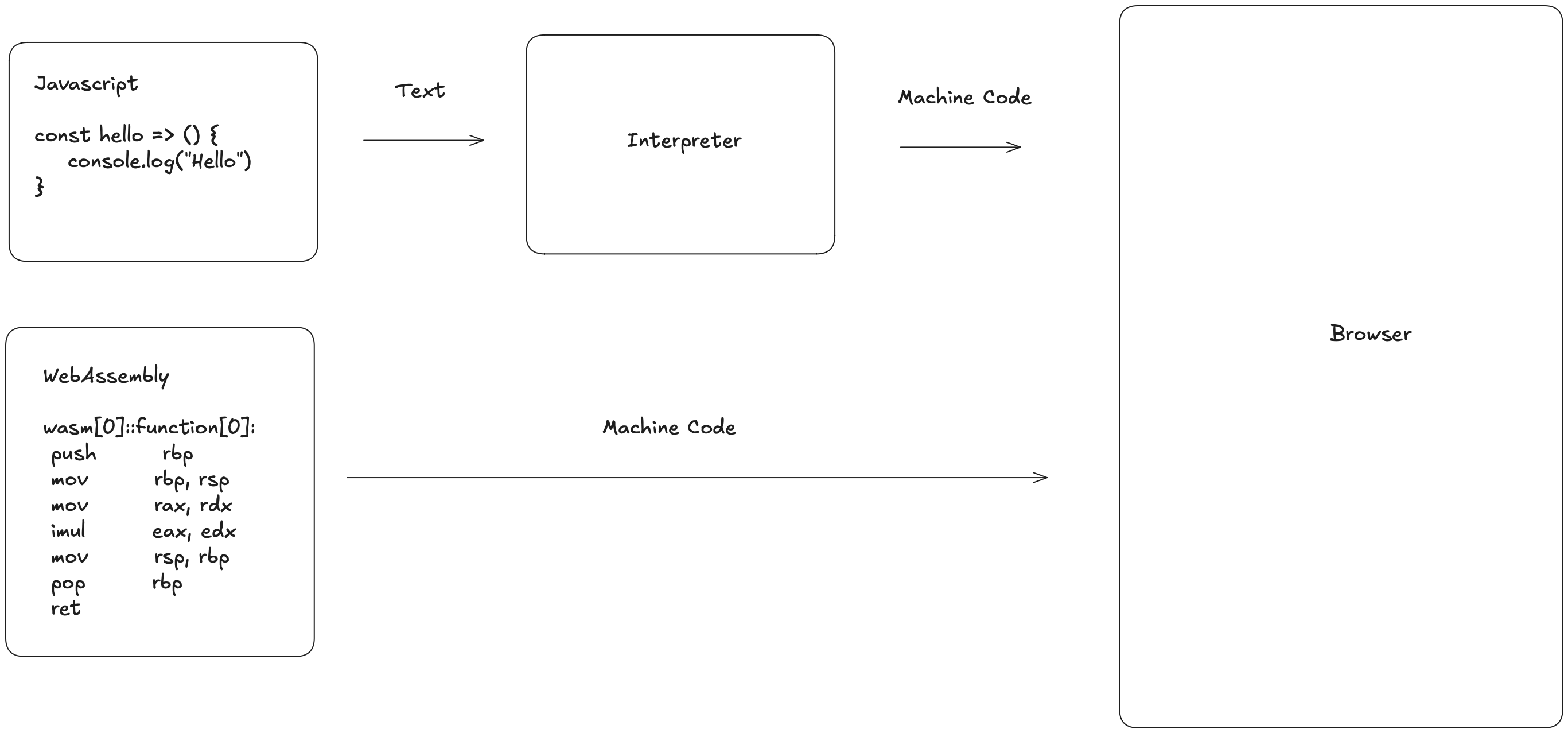
Skipping the interpretation step offers two key benefits:
Direct Execution: Interpreting code requires reading the source code one expression at a time and converting it to machine code on the fly, which adds time.
Compiler Optimizations: WebAssembly code is precompiled, enabling the compiler to optimize it more effectively, unlike JavaScript, which interprets code one piece at a time, missing out on these optimizations.
To illustrate this, I’ve created two examples you can test yourself here.
1: Fibonacci Number
The first example try’s to calculate the 40th fibonacci number in pure javascript and in rust compiled to web assembly. The code in JavaScript is
# JavaScript
function fibonacciJS(n) {
    if (n <= 0) {
        return 0
    } else if (n == 1) {
        return 1
    } else {
        return fibonacciJS(n - 1) + fibonacciJS(n - 2)
    }
}

# Rust

pub fn fibonacci_wasm(n: i32) -> i32 {
    if n <= 0 {
        return 0;
    } else if n == 1 {
        return 1;
    } else {
        return fibonacci_wasm(n - 1) + fibonacci_wasm(n - 2);
    }
}
Both versions are functionally identical, but WebAssembly is faster because it skips the interpretation layer. On my M1 Max MacBook Pro using Safari I get the following results.

Your results might vary, depending on what device and browser you use (In Firefox the javascript uses around 1600 milliseconds, and the web assembly is executed in around 600 milliseconds). But in most cases the web assembly code will be faster. In this case it is 50% faster.
2: Loop
The next test, will create a loop, which runs 1.000.000.000 times and adds 1 to a number starting at 0. The code again is for all intents and purposes identical, and looks like this
# JavaScript
function add1000000000JS() {
    var i = 0
    while (i < 1000000000) {
        i++
    }
    return i
}

# Rust
pub fn add1000000000_wasm() -> i32 {
    let mut i: i32 = 0;
    while i < 1000000000 {
        i += 1;
    }
    return i;
}
Here we see a significant speed up, where the javascript takes 337 milliseconds and the WebAssembly finishes in 0 milliseconds. A speed up of this magnitude, cannot be purely due to the omission of the interpreter, something else must be going on. When we look at the WebAssembly code generated, we clearly see what happens. The loop compiled to WebAssembly looks like this.
(func $add1000000000_wasm (export "add1000000000_wasm") (type $t2) (result i32)
    (i32.const 1000000000))
The compiler looked at our function, and realised it does not have to do the loop, instead it can just return the number 1.000.000.000. This is not possible for the javascript interpreter, since it does not read the function as one unit, but instead evaluates the code one expression at the time.
Making our idea into something useful with DuckDB
At this point, you should have a sense of why I chose these tools and how WebAssembly enhances performance. However, we haven’t yet created anything practical for end users. Now, let's build the first component of our analytics platform by integrating DuckDB.
DuckDB is a high-performance analytical database designed for efficient data processing. It enables us to load data from CSV, Parquet, and JSON files and query it using SQL, which is ideal for our tool's analytical needs. This initial integration of DuckDB will allow users to upload data and query it directly in their browser, laying the foundation for powerful client-side analytics.
Fortunately, DuckDB is already compiled for WebAssembly, making it easy to integrate into our application via a CDN. With a bit of JavaScript, HTML, and CSS, we can create an application where users can upload CSV, JSON, or Parquet files and work with them as though they are tables in a SQL database. This setup provides a familiar and efficient SQL interface for data exploration without data leaving the user’s device.
I won’t go into detail on how to code this website. If you're interested in that part, I recommend this YouTube video by Mike Porter, which I used as inspiration. Additionally, all the code for this application is available in this GitHub repo.
Here is a demo of how the application looks. You can upload either CSV, JSON, or Parquet files and work with them as if they were tables in a SQL database.
If you want to try the application yourself, you can do so here. In the coming weeks, I’ll be adding error handling and more metadata functionality. I’ll also work on expanding the analytics tool with features like segmentation and built-in forecasting. If you’d like to follow along with the journey, please subscribe!